Canon Powershot SD790 IS Mini USB Port Replacement

What you need

  1. Canon Powershot SD790 IS Mini USB Port Replacement, Canon Powershot SD790 IS Mini USB Port Replacement: step 1, image 1 of 1
    • Remove screw attaching the Mini USB Cover to the top of the camera body.

    Add Comment

  2. Canon Powershot SD790 IS Mini USB Port Replacement: step 2, image 1 of 1
    • Remove Mini USB Cover, by pulling it away from the camera body.

    Add Comment

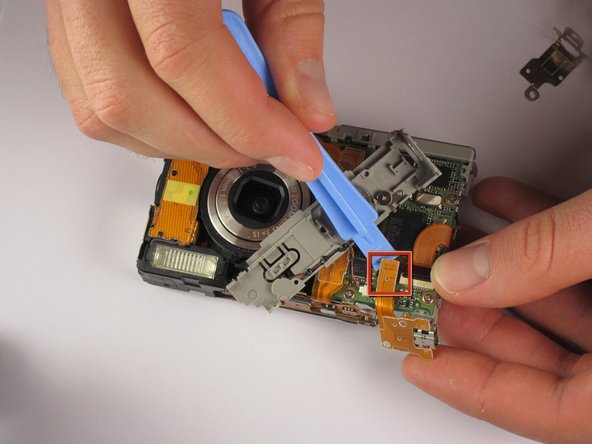
  3. Canon Powershot SD790 IS Mini USB Port Replacement: step 3, image 1 of 1
    • Detach electronic ribbon and Mini USB Port using a plastic opening tool to pull the ribbon off.

    • You can now replace the Mini USB Port.

    Add Comment

Conclusion

To reassemble your device, follow these instructions in reverse order.

Cancel: I did not complete this guide.

System

Member since: 09/24/09

2,562 Guides authored

0 Guide Comments

Add Comment

View Statistics:

Past 24 Hours: 0

Past 7 Days: 0

Past 30 Days: 4

All Time: 22