Disassembling Power Mac G4 Cube Outer Case

What you need

  1. Disassembling Power Mac G4 Cube Outer Case, Disassembling Power Mac G4 Cube Outer Case: step 1, image 1 of 3 Disassembling Power Mac G4 Cube Outer Case, Disassembling Power Mac G4 Cube Outer Case: step 1, image 2 of 3 Disassembling Power Mac G4 Cube Outer Case, Disassembling Power Mac G4 Cube Outer Case: step 1, image 3 of 3
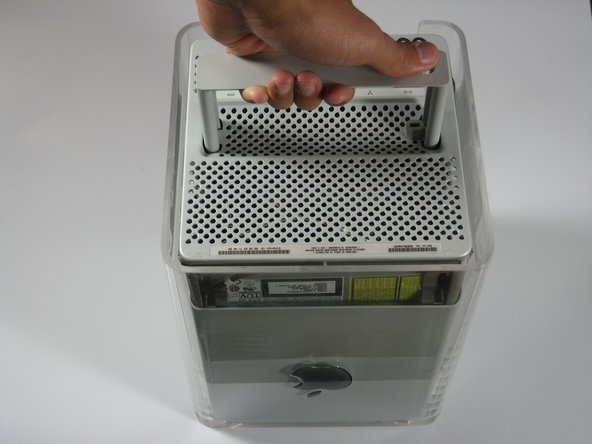
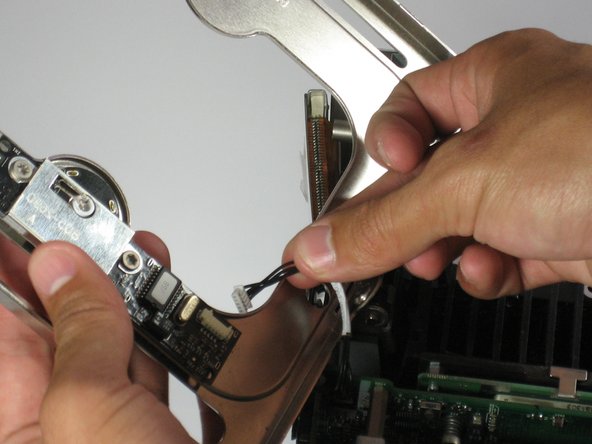
    • Release the back handle of the PowerMac. Slowly pull out the cube by holding the end of the handle. Watch for any parts that may become entangled with the outer case.

    • Push back the handle after you have taken the core out of the case.

    Add Comment

  2. Disassembling Power Mac G4 Cube Outer Case: step 2, image 1 of 2 Disassembling Power Mac G4 Cube Outer Case: step 2, image 2 of 2
    • Place the cube upside down and remove the four T10 Torx screws on the front plate. Then remove the two screws on each side.

    Add Comment

  3. Disassembling Power Mac G4 Cube Outer Case: step 3, image 1 of 1
    • Slowly lift the plate off the cube and disconnect the power cord.

    Add Comment

  4. Disassembling Power Mac G4 Cube Outer Case: step 4, image 1 of 1
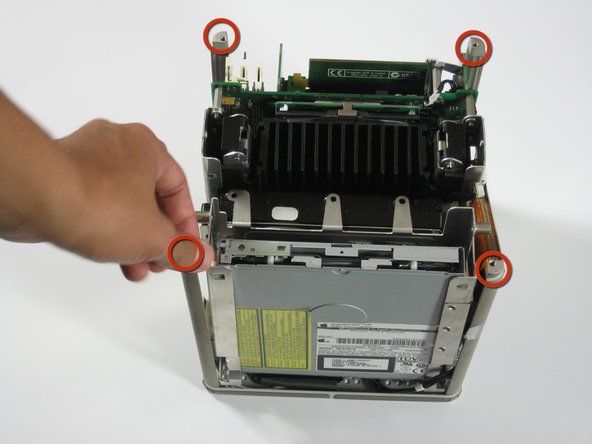
    • Remove the four pillars from each corner.

    • The pillars should come out fairly easily.

    Add Comment

Conclusion

To reassemble your device, follow these instructions in reverse order.

Cancel: I did not complete this guide.

System

Member since: 09/24/09

2,562 Guides authored

0 Guide Comments

Add Comment

View Statistics:

Past 24 Hours: 0

Past 7 Days: 0

Past 30 Days: 3

All Time: 40