Inkjet Printer

Last updated on Sep 11, 2018
Views: 112
View statistics:
- Past 24 Hours:
- 0
- Past 7 Days:
- 0
- Past 30 Days:
- 4
- All Time:
- 112
Comments: 0
No one has left comments on this guide. Will you be first?
Go to guide commentsCompleted: 0 1
No one has marked this guide "completed." Will you be the first?
1 person has marked this guide "completed." It's you — great job!
Favorites: 0 1
No one has favorited (and subscribed to) this guide. Will you be the first?
1 person has favorited (and subscribed to) this guide — and that's you!
Introduction
Go to step 1 ↓Due to the large variety of printers available on the market it is impossible to give a specific manual how to dismantle a printer. Therefore, the dismantling steps for inkjet printers indicated below have to be adapted from case to case. No dismantling times and average weight can be indicated.


-
-
-
Remove the ink cartridges and put them aside. Cartridges can be refilled and reused!
-
-
-
Open the plastic casing by unscrewing all screws and removing clips. Clean the casing properly by removing all the foreign materials in the plastic such as labels, rubber mountains etc.
-
Make sure the plastic parts are completely free of metal pieces.
-
-
-
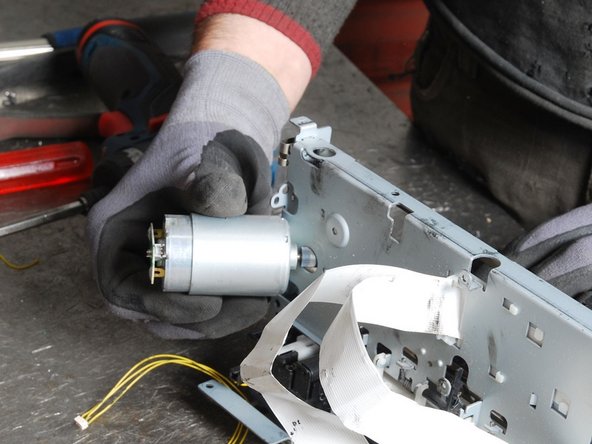
Remove the printer motor. If possible, separate the copper coil or the magnets inside the motor.
-
The magnets should be stored separately .
-
-
-
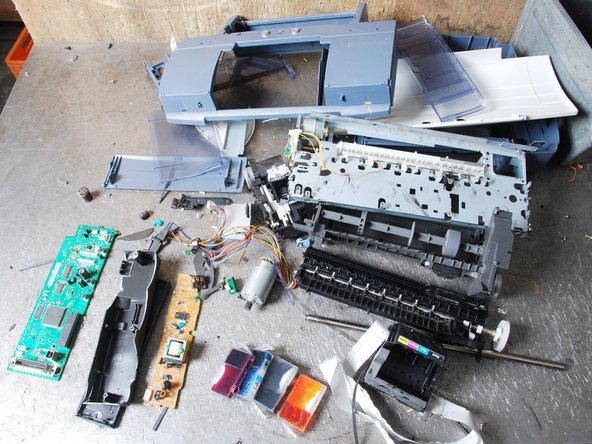
Separate the remaining materials according to their type.
-
Make sure the plastic parts are completely free of metal pieces.
-
-