MacBook Core Duo Memory Cover Replacement

What you need

    1. MacBook Core Duo Memory Cover Replacement, MacBook Core Duo Memory Cover Replacement: step 1, image 1 of 1
      • Use a coin to rotate the battery-locking screw 90 degrees clockwise.

      Add Comment

    2. MacBook Core Duo Memory Cover Replacement: step 2, image 1 of 1
      • Lift the battery out of the computer.

      Add Comment

    3. MacBook Core Duo Memory Cover Replacement: step 3, image 1 of 1
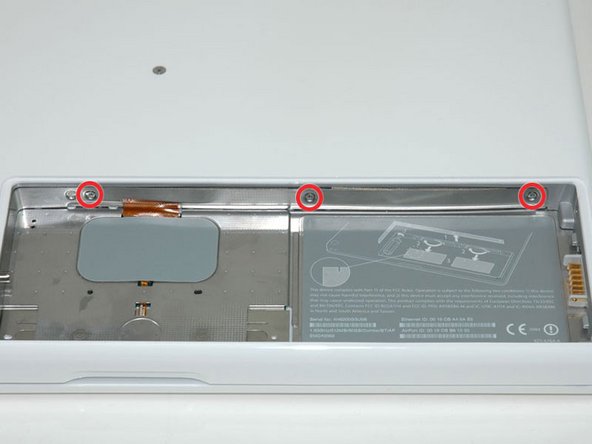
      • Remove the three evenly-spaced Phillips screws from along the rear wall of the battery compartment.

      • The screws are captive to the metal memory cover.

      • When replacing the battery casing, use a spudger to re-insert the foam cushioning behind the rear wall for propper battery spacing.

      Add Comment

    4. MacBook Core Duo Memory Cover Replacement: step 4, image 1 of 1
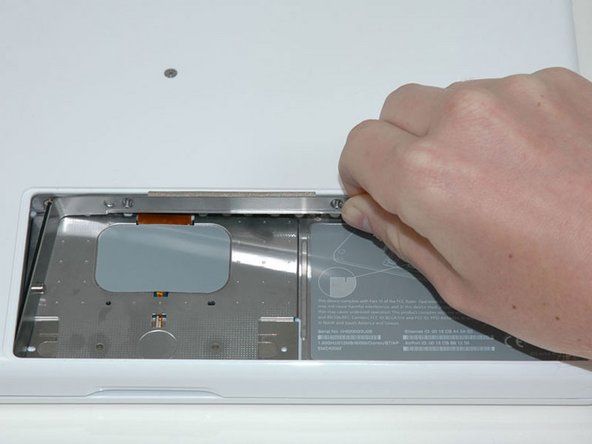
      • Lift up on L-shaped memory cover, slide it to the right, and lift it out of the computer.

      Add Comment

Conclusion

To reassemble your device, follow these instructions in reverse order.

Cancel: I did not complete this guide.

System

Member since: 09/24/09

2,562 Guides authored

0 Guide Comments

Add Comment

View Statistics:

Past 24 Hours: 0

Past 7 Days: 0

Past 30 Days: 0

All Time: 15