
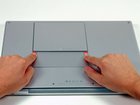
MacBook Pro 15" Core Duo Model A1150 Battery Replacement

Last updated on Sep 17, 2016
Views: 25
View statistics:
- Past 24 Hours:
- 0
- Past 7 Days:
- 0
- Past 30 Days:
- 2
- All Time:
- 25
Comments: 0
No one has left comments on this guide. Will you be first?
Go to guide commentsCompleted: 0 1
No one has marked this guide "completed." Will you be the first?
1 person has marked this guide "completed." It's you — great job!
Favorites: 0 1
No one has favorited (and subscribed to) this guide. Will you be the first?
1 person has favorited (and subscribed to) this guide — and that's you!
Time Required: No estimate
Difficulty: Very easy
Introduction
Go to step 1 ↓All you need to remove the battery is your fingers!
What you need
-
-
-
Use your fingers to push both battery release tabs away from the battery, and lift the battery out of the computer.
-
-

Conclusion
To reassemble your device, follow these instructions in reverse order.

