Power Mac G4 M5183 Main Fan Replacement

What you need

    1. Power Mac G4 M5183 Main Fan Replacement, Power Mac G4 M5183 Main Fan Replacement: step 1, image 1 of 2 Power Mac G4 M5183 Main Fan Replacement, Power Mac G4 M5183 Main Fan Replacement: step 1, image 2 of 2
      • Pull on outer latch.

      • Lower door until it is level with your work surface.

      • Before working on the computer make sure it is not plugged into a power supply, then touch a metal object. This discharges static electricity, which could damage the computer.

      Add Comment

    2. Power Mac G4 M5183 Main Fan Replacement: step 2, image 1 of 2 Power Mac G4 M5183 Main Fan Replacement: step 2, image 2 of 2
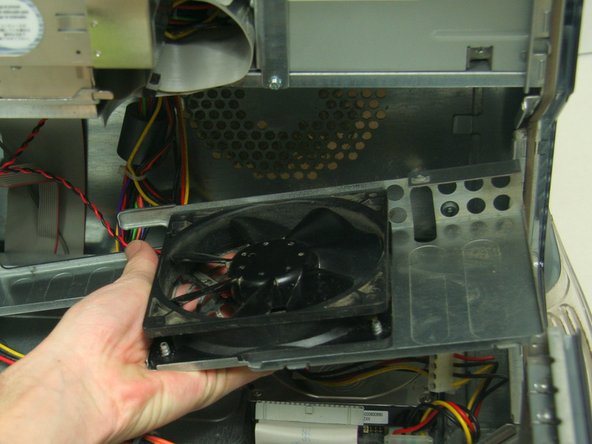
      • Remove the screw from each of the two niches on lower part of fan using the Phillips #1 screwdriver.

      • The fan housing will still be connected to the computer by a power cable which will be removed in the next step.

      Add Comment

    3. Power Mac G4 M5183 Main Fan Replacement: step 3, image 1 of 1
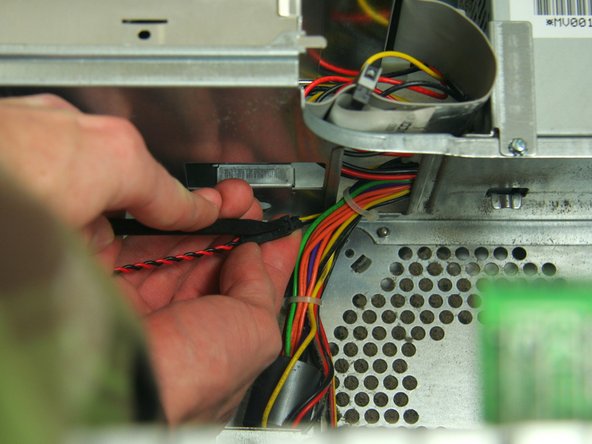
      • Remove the power cable from the fan and detach bracing.

      Add Comment

    4. Power Mac G4 M5183 Main Fan Replacement: step 4, image 1 of 1
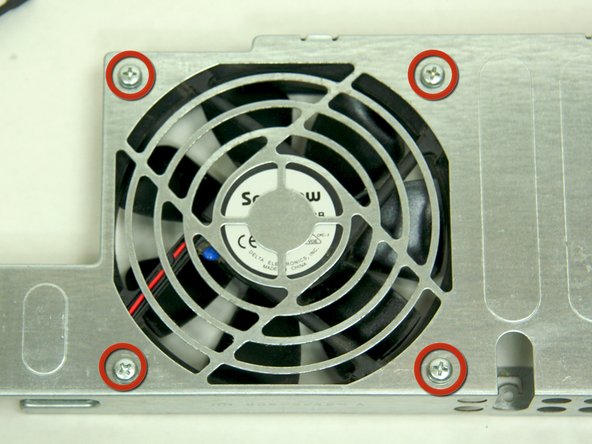
      • To fully remove the fan, unfasten the 4 screws on the front of the bracing using the Phillips #2 screwdriver.

      Add Comment

Conclusion

To reassemble your device, follow these instructions in reverse order.

Cancel: I did not complete this guide.

System

Member since: 09/24/09

2,562 Guides authored

0 Guide Comments

Add Comment

View Statistics:

Past 24 Hours: 0

Past 7 Days: 0

Past 30 Days: 0

All Time: 15