PowerBook G4 Aluminum 12" 867 MHz EMI Finger Replacement

What you need

  1. PowerBook G4 Aluminum 12" 867 MHz EMI Finger Replacement, PowerBook G4 Aluminum 12" 867 MHz EMI Finger Replacement: step 1, image 1 of 1
    • Use a coin to turn the battery locking screw 90 degrees to the right.

    • Lift the battery out of the computer.

    Add Comment

  2. PowerBook G4 Aluminum 12" 867 MHz EMI Finger Replacement: step 2, image 1 of 1
    • Remove the four Phillips screws from the memory door.

    • Slide the memory door away from the memory compartment.

    Add Comment

  3. PowerBook G4 Aluminum 12" 867 MHz EMI Finger Replacement: step 3, image 1 of 1
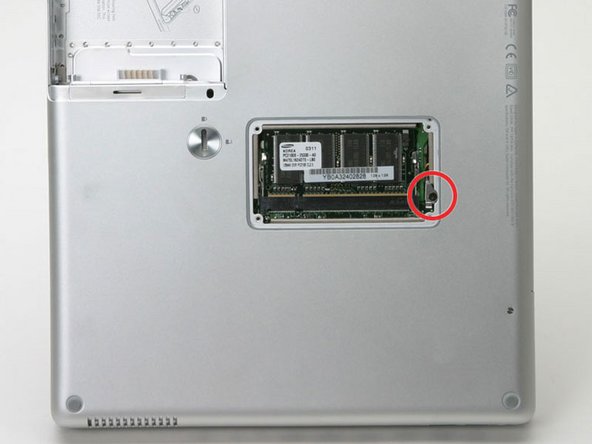
    • Remove the long black Phillips screw next to the memory card.

    • Remove the small EMI finger beneath the black screw.

    Add Comment

Conclusion

To reassemble your device, follow these instructions in reverse order.

Cancel: I did not complete this guide.

System

Member since: 09/24/09

2,562 Guides authored

0 Guide Comments

Add Comment

View Statistics:

Past 24 Hours: 0

Past 7 Days: 0

Past 30 Days: 3

All Time: 25