Toshiba Satellite M305D-S4829 RAM Replacement

What you need

    1. Toshiba Satellite M305D-S4829 RAM Replacement, Toshiba Satellite M305D-S4829 RAM Replacement: step 1, image 1 of 1
      • Unscrew the three screws from the back panel with Phillips #0 screwdriver.

      • Remove the back panel.

      Add Comment

    2. Toshiba Satellite M305D-S4829 RAM Replacement: step 2, image 1 of 3 Toshiba Satellite M305D-S4829 RAM Replacement: step 2, image 2 of 3 Toshiba Satellite M305D-S4829 RAM Replacement: step 2, image 3 of 3
      • Locate the two clips holding the RAM chip in place.

      • Apply pressure to each clip, pulling them away from the RAM.

      • One end of the RAM will pop out.

      Add Comment

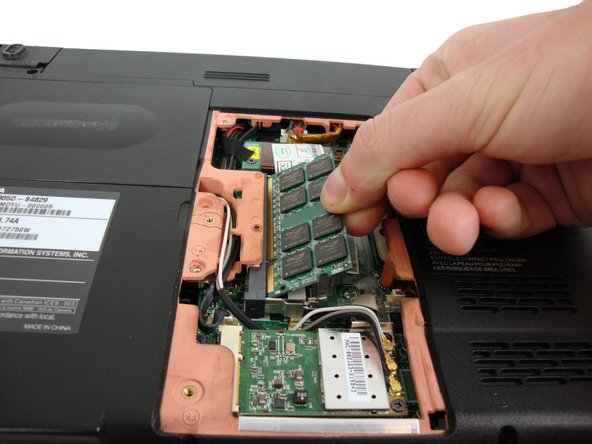
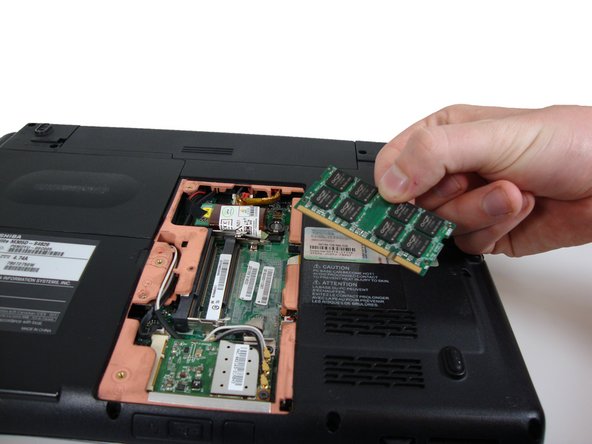
    3. Toshiba Satellite M305D-S4829 RAM Replacement: step 3, image 1 of 2 Toshiba Satellite M305D-S4829 RAM Replacement: step 3, image 2 of 2
      • Gently pull RAM out as shown.

      Add Comment

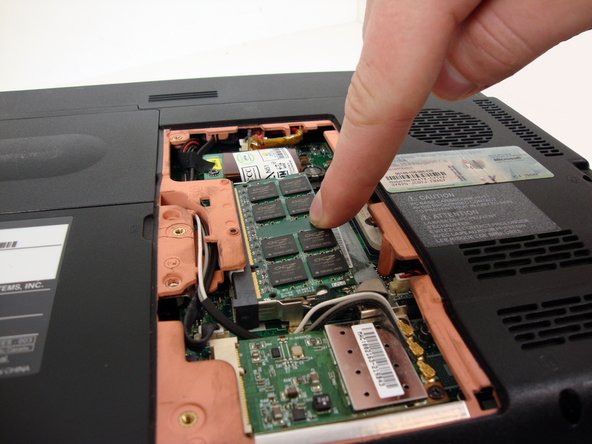
    4. Toshiba Satellite M305D-S4829 RAM Replacement: step 4, image 1 of 1
      • To intall a new stick of RAM, carefully insert it into into the RAM slot.

      • Gently push down on the RAM chip until it snaps securely into place.

      Add Comment

Conclusion

To reassemble your device, follow these instructions in reverse order.

Cancel: I did not complete this guide.

System

Member since: 09/24/09

2,562 Guides authored

0 Guide Comments

Add Comment

View Statistics:

Past 24 Hours: 0

Past 7 Days: 0

Past 30 Days: 2

All Time: 41