
Toshiba Satellite M45 Optical Drive Replacement

Last updated on Apr 11, 2016
Views: 22
View statistics:
- Past 24 Hours:
- 0
- Past 7 Days:
- 0
- Past 30 Days:
- 0
- All Time:
- 22
Comments: 0
No one has left comments on this guide. Will you be first?
Go to guide commentsCompleted: 0 1
No one has marked this guide "completed." Will you be the first?
1 person has marked this guide "completed." It's you — great job!
Favorites: 0 1
No one has favorited (and subscribed to) this guide. Will you be the first?
1 person has favorited (and subscribed to) this guide — and that's you!
Introduction
Go to step 1 ↓This guide will illustrate how to replace your optical drive.
-
-
-
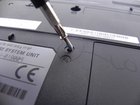
Remove the ODD screw with a #1 Phillips head screwdriver as indicated in the picture.
-
Using a flat edge tool, pry it the drive out of it slot from the side of the casing. You can then use your hands to continue pulling the rest the way out of its slot.
-
-


To reassemble your device, follow these instructions in reverse order.

