
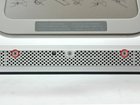
iMac G5 20" Model A1145 Access Door Replacement

Last updated on Sep 17, 2016
Views: 23
View statistics:
- Past 24 Hours:
- 0
- Past 7 Days:
- 0
- Past 30 Days:
- 1
- All Time:
- 23
Comments: 0
No one has left comments on this guide. Will you be first?
Go to guide commentsCompleted: 0 1
No one has marked this guide "completed." Will you be the first?
1 person has marked this guide "completed." It's you — great job!
Favorites: 0 1
No one has favorited (and subscribed to) this guide. Will you be the first?
1 person has favorited (and subscribed to) this guide — and that's you!
Time Required: No estimate
Difficulty: Moderate
Introduction
Go to step 1 ↓Remove the access door to replace RAM chips.
What you need
-
-
-
Orient the iMac face-side down on a table with the bottom edge facing yourself.
-
Remove the two Phillips screws securing the access door to the bottom grille of your iMac.
-
-


Conclusion
To reassemble your device, follow these instructions in reverse order.

