
iPhone 1st Generation Antenna Cover Replacement

Last updated on Sep 17, 2016
Views: 17
View statistics:
- Past 24 Hours:
- 0
- Past 7 Days:
- 0
- Past 30 Days:
- 2
- All Time:
- 17
Comments: 0
No one has left comments on this guide. Will you be first?
Go to guide commentsCompleted: 0 1
No one has marked this guide "completed." Will you be the first?
1 person has marked this guide "completed." It's you — great job!
Favorites: 0 1
No one has favorited (and subscribed to) this guide. Will you be the first?
1 person has favorited (and subscribed to) this guide — and that's you!
Introduction
Go to step 1 ↓The plastic cover over the antenna on the rear bottom of the iPhone.
What you need
-
-
-
Insert a SIM card eject tool or paper clip into the hole next to the headphone jack.
-
Press down on the paper clip until the SIM card tray pops out.
-
-
-
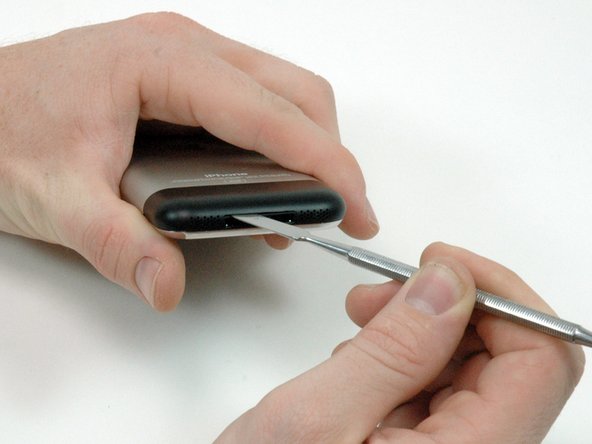
Insert a metal spudger into the slot between the dock connector and the antenna cover. Gently pry up near the two tabs to create a small gap between the antenna cover and the silver front bezel.
-
-
-
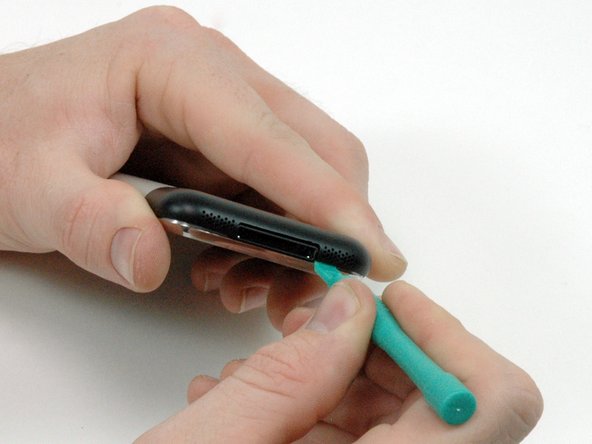
Insert an iPod opening tool in the gap between the antenna cover and the front bezel. The wedge of the tool should be pointing towards the antenna cover. Slide the tool around the corner and up until you reach the metal backing.
-
Repeat the same procedure on the other side of the dock connector.
-
-
-
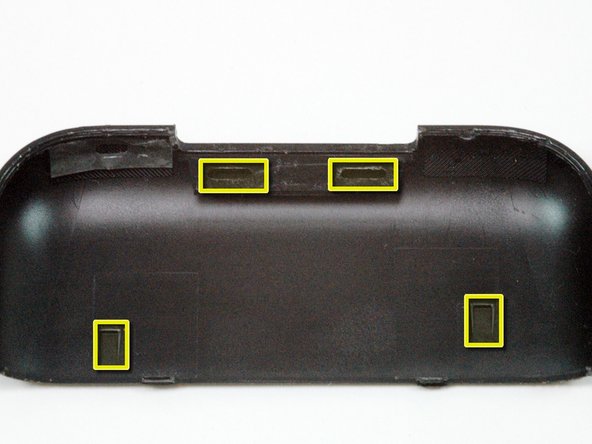
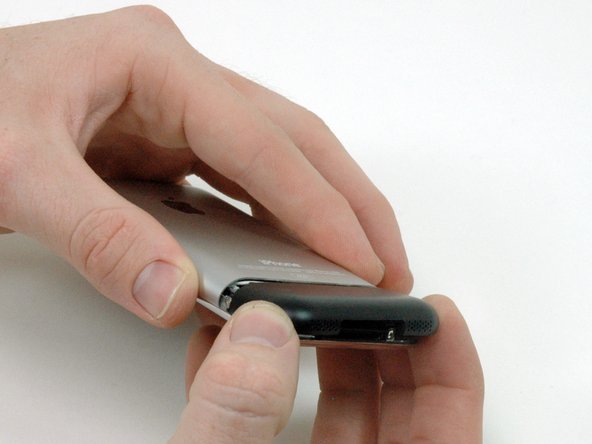
Grasp the antenna cover on either side and slide it up and away from the iPhone. This requires some force. If it does not come free, ensure that the antenna cover is lifted up enough to free the catches.
-
-


To reassemble your device, follow these instructions in reverse order.

