
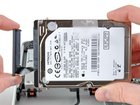
MacBook Pro 13" Unibody Early 2011 Hard Drive Replacement

Last updated on Sep 17, 2016
Views: 32
View statistics:
- Past 24 Hours:
- 0
- Past 7 Days:
- 0
- Past 30 Days:
- 0
- All Time:
- 32
Comments: 0
No one has left comments on this guide. Will you be first?
Go to guide commentsCompleted: 0 1
No one has marked this guide "completed." Will you be the first?
1 person has marked this guide "completed." It's you — great job!
Favorites: 0 1
No one has favorited (and subscribed to) this guide. Will you be the first?
1 person has favorited (and subscribed to) this guide — and that's you!
Introduction
Go to step 1 ↓Use this guide to replace a dead hard drive.
What you need
Parts
-
1 TB SSD Hybrid 2.5" Hard Drive (Upgrade Kit) Available for sale on iFixit
This kit contains the drive and all tools needed.
-
500 GB SSD Hybrid 2.5" Hard Drive (Upgrade Kit) Available for sale on iFixit
This kit contains the part and all tools needed.
-
256 GB Solid State Drive (Upgrade Kit) Available for sale on iFixit
This kit contains the drive and all tools needed.
-
128 GB Solid State Drive (Upgrade Kit) Available for sale on iFixit
This kit contains the part and all tools needed.
Tools
Video Overview
-
-
-
Remove the following ten screws:
-
Three 14.4 mm Phillips #00 screws
-
Three 3.5 mm Phillips #00 screws
-
Four 3.5 mm shouldered Phillips #00 screws
-
-
-
Use your fingers to pry the lower case away from the body of the MacBook near the vent.
-
Remove the lower case.
-
-
-
Use the edge of a spudger to pry the battery connector upwards from its socket on the logic board.
-
-
-
Bend the battery cable slightly away from its socket on the logic board so it does not accidentally connect itself while you work.
-
-
-
Remove the four 6.0 mm T6 Torx hard drive retaining posts from the sides of the hard drive.
-
Transfer the hard drive retaining posts to your new hard drive.
-
-


To reassemble your device, follow these instructions in reverse order.

